
How to install CookieHub in Cloudflare Zaraz
Cloudflare Zaraz is a tag-management and script-loading platform built by Cloudflare, Inc. that allows you to offload third-party tools (like analytics, marketing pixels, chat widgets, etc.) to Cloudflare’s edge network — reducing performance impact, improving site speed and security.
One of Zaraz’s key features is its Consent Management module, which lets you govern how and when scripts are fired based on user consent. This aligns well with consent-first tools like CookieHub, enabling you to tie your CMP’s consent states to the Zaraz tag triggers and purposes.
Step 1: Open Cloudflare Zaraz
- Go to your Cloudflare dashboard.
- Navigate to Protect & Connect → Delivery & performance → Web tag management (Zaraz).
- Select Consent and choose the domain where you want to install CookieHub.
Step 2: Configure Zaraz consent management
- Check Enable Consent Management.
-
Uncheck Show consent modal and Use IAB TCF compliant modal.
• CookieHub provides the consent dialog.
• The IAB TCF modal is only supported with the Zaraz modal.
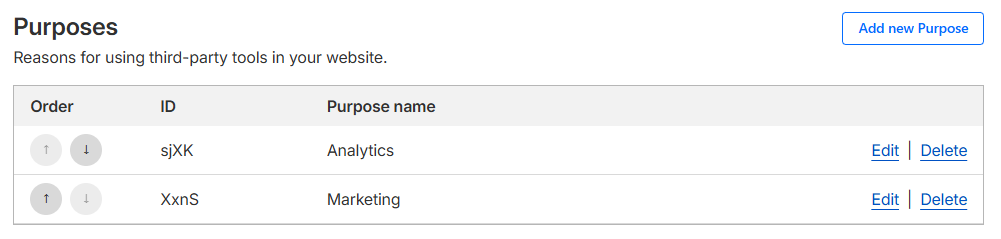
Step 3: Create Zaraz consent purposes
- Scroll down to the Purposes section.
-
Click Add new purpose.
Create purposes for the categories your tags require — for most users this includes:
• Analytics
• Marketing
- Enter a name and description for each purpose.
-
Write down the Purpose IDs — you will need them later when connecting CookieHub.
Step 4: Assign purposes to tools
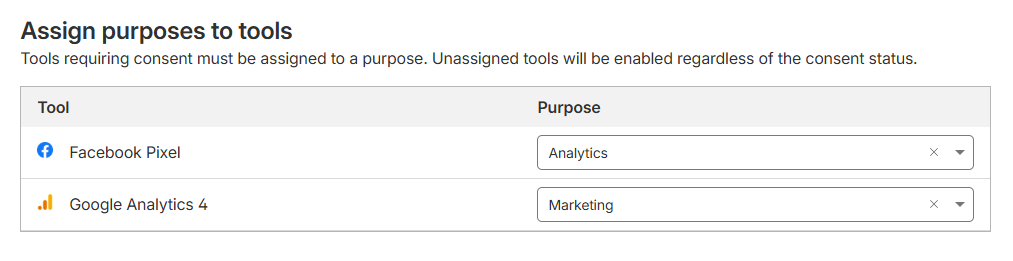
- Scroll down to the Assign Purposes to tools section.
- Assign the appropriate purposes to each tool that depends on consent (Analytics, Marketing, etc.).
- Save settings.
This ensures that Zaraz will only fire these tools when CookieHub has granted consent for the matching category.
Step 4: Add CookieHub as a Custom HTML tool
Now that your purposes exist and you have the Purpose IDs, you can install CookieHub.
- Select the Tag setup section and choose the domain where you want to install CookieHub
- Click Add new tool and choose Custom HTML.
- Give the tool a descriptive name, for example, “CookieHub CMP.”
- Select Pageview as the Firing trigger.
- Find your CookieHub domain code (8 characters) - Where to find your domain code
- Replace the <domain-code> in the following script with your domain code.
- Add your Purposes to the COOKIEHUB_TO_ZARAZ_PURPOSES object in the script, replace the <analytics-purpose-id> and <marketing-purpose-id> with your Purpose IDs that you created earlier or remove if they aren't needed.
- Paste the following script with your CookieHub domain code and Purpose IDs into the HTML Code field.
// Remember to replace the <domain-code> with your CookieHub domain code
<script src="https://cdn.cookiehub.eu/c2/<domain-code>.js"></script>
<script type="text/javascript">
window.COOKIEHUB_TO_ZARAZ_PURPOSES = {
  // CookieHub category -> array of Zaraz purpose IDs
  // Leave empty or remove categories that aren't used
  necessary:        [],
  preferences:      [],
  analytics:        ["<analytics-purpose-id>"],
  marketing:        ["<marketing-purpose-id>"],
  uncategorized:    []
};

var cpm = {
  onInitialise: function(status) {
    syncConsentToZaraz();
  },
  onStatusChange: function(status, previousStatus) {
    syncConsentToZaraz();
  }
}
if (window.cookiehub) {
window.cookiehub.load(cpm);
}
else {
    setTimeout(function () {
    if (window.cookiehub) {
      window.cookiehub.load(cpm);
    }
  }, 500);
}

// Build a Zaraz consent object from current CookieHub state
function buildZarazConsentFromCookieHub() {
  if (!window.cookiehub) {
    return {};
  }

  const consentPreferences = {};

  Object.entries(window.COOKIEHUB_TO_ZARAZ_PURPOSES).forEach(
    ([cookiehubCategory, zarazPurposes]) => {

      if (!Array.isArray(zarazPurposes) || zarazPurposes.length === 0) {
        return;
      }

      const allowed = window.cookiehub.hasConsented(cookiehubCategory);

      zarazPurposes.forEach((purposeId) => {
        consentPreferences[purposeId] = allowed;
      });
    }
  );

  return consentPreferences;
}

// Apply CookieHub state to Zaraz
function syncConsentToZaraz() {
  if (!window.cookiehub || !window.zaraz || !window.zaraz?.consent?.APIReady) {
    return;
  }

  const consentPreferences = buildZarazConsentFromCookieHub();

  // Set consent per purpose in Zaraz
  window.zaraz.consent.set(consentPreferences); // :contentReference[oaicite:0]{index=0}

  //console.log("Synced CookieHub consent to Zaraz:", consentPreferences);
}

document.addEventListener("zarazConsentAPIReady", () => {
  syncConsentToZaraz();
});
</script>
CookieHub and Zaraz are now fully connected. When a user updates their consent in CookieHub, the consent state is passed to Zaraz immediately and affects all tools assigned to those purposes.
If you already have CookieHub installed
NOTE: This will only work for CookieHub version 2.8.13 and higher.
If CookieHub is already implemented on your site by another method (for example, directly in your HTML or via Google Tag Manager), you can skip Step 4.
Instead follow these steps.
- Add your Purposes to the COOKIEHUB_TO_ZARAZ_PURPOSES object in the following script, replace the <analytics-purpose-id> and <marketing-purpose-id> with your Purpose IDs that you created earlier or remove if they aren't needed.
- Add the following script with your Purpose IDs to your domain.
You can add the script by creating a Custom HTML tool in Zaras.
<script type="text/javascript">
window.COOKIEHUB_TO_ZARAZ_PURPOSES = {
  // CookieHub category -> array of Zaraz purpose IDs
  // Leave empty or remove categories that aren't used
  necessary:        [],
  preferences:      [],
  analytics:        ["<analytics-purpose-id>"],
  marketing:        ["<marketing-purpose-id>"],
  uncategorized:    []
};

// Build a Zaraz consent object from current CookieHub state
function buildZarazConsentFromCookieHub() {
  if (!window.cookiehub) {
    return {};
  }

  const consentPreferences = {};

  Object.entries(window.COOKIEHUB_TO_ZARAZ_PURPOSES).forEach(
    ([cookiehubCategory, zarazPurposes]) => {

      if (!Array.isArray(zarazPurposes) || zarazPurposes.length === 0) {
        return;
      }

      const allowed = window.cookiehub.hasConsented(cookiehubCategory);

      zarazPurposes.forEach((purposeId) => {
        consentPreferences[purposeId] = allowed;
      });
    }
  );

  return consentPreferences;
}

// Apply CookieHub state to Zaraz
function syncConsentToZaraz() {
  if (!window.cookiehub || !window.zaraz || !window.zaraz?.consent?.APIReady) {
    return;
  }

  const consentPreferences = buildZarazConsentFromCookieHub();

  // Set consent per purpose in Zaraz
  window.zaraz.consent.set(consentPreferences);

  //console.log("Synced CookieHub consent to Zaraz:", consentPreferences);
}

/* --------- CookieHub event listeners --------- */
// Fires when CookieHub is initialized
document.addEventListener("cookiehub_onInitialise", (eventData) => {
  syncConsentToZaraz();
});

// Fires whenever user changes settings / accepts all / rejects all
document.addEventListener("cookiehub_onStatusChange", (eventData) => {
  syncConsentToZaraz();
});

document.addEventListener("zarazConsentAPIReady", () => {
  syncConsentToZaraz();
});

</script>