
LiteSpeed compatibility with CookieHub
LiteSpeed is a popular WordPress caching solution that improves site performance. However, caching can interfere with the CookieHub widget and its features. If not configured correctly, you might see:
- Delayed loading or initialization of the CookieHub widget
- Cookie blocking not working as expected, which can lead to compliance issues
These problems occur because LiteSpeed may serve cached JavaScript files instead of the dynamic scripts needed by CookieHub.
How to exclude CookieHub scripts from LiteSpeed
Follow these steps to avoid conflicts:
- In your WordPress dashboard, go to LiteSpeed Cache > Page Optimization.
-
Open the Tuning tab. Find the sections for JS Excludes and Load JS Deferred.
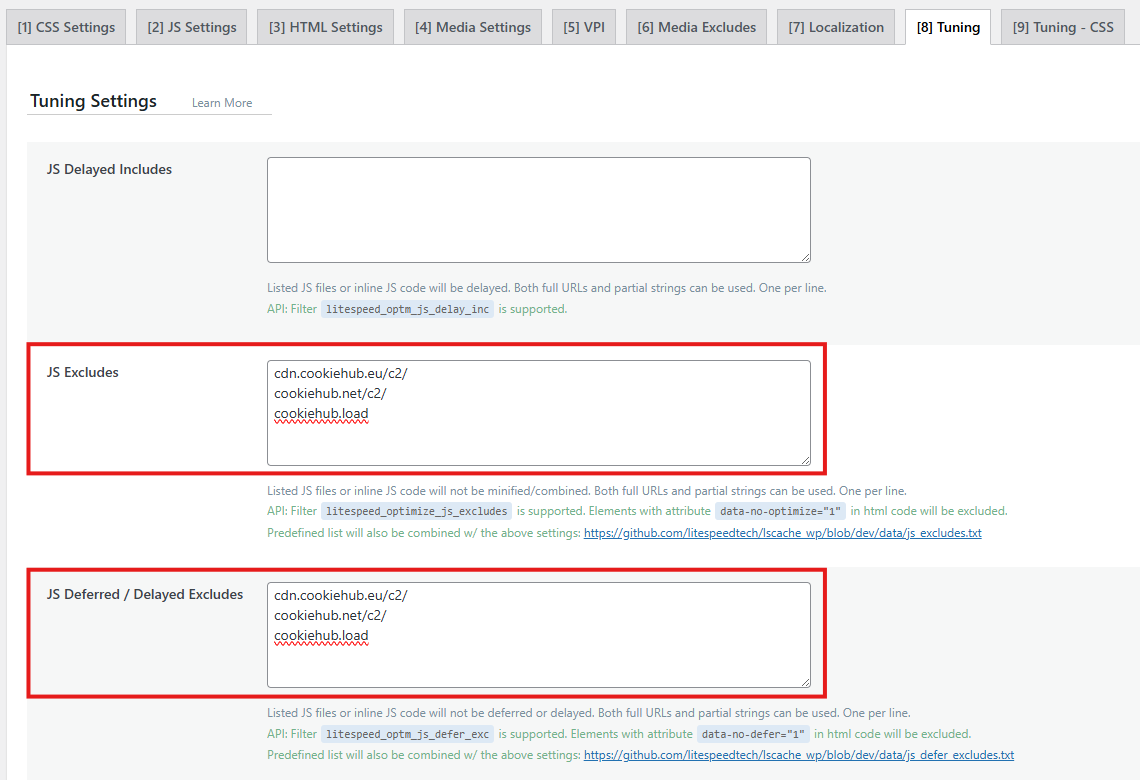
- Add these patterns to exclude CookieHub scripts:
cdn.cookiehub.eu/c2/
cookiehub.net/c2/
cookiehub.load
googletagmanager.com/gtm.js
These exclusions ensure CookieHub scripts are not cached or optimized.
Note: If CookieHub is not implemented using Google Tag Manager, you can remove googletagmanager.com/gtm.js from the list.
- Save your changes and clear the site cache to apply the settings.